
TL;DR
- The Problem: Every architecture diagram of a large system shows the end state. Teams copy the end state on day one and drown in complexity, or ignore scaling until the database falls over during a launch.
- The Design: Grow in eight steps (separate the database, add a load balancer, add read replicas and a cache, move static files to a CDN and make app servers stateless, push slow work to queues, add regions, shard the primary), and take each step only when a metric says the previous design has run out.
- The Result: A system that is never more complex than its traffic requires, with a clear next move ready when a dashboard turns red. Many very large products ran for years on surprisingly few machines because they took these steps late and well.
Stack Overflow, one of the busiest sites on the internet, famously ran on around nine web servers and a few SQL Server machines for years. Instagram reached tens of millions of users with a small team and a fairly conventional stack of Django, PostgreSQL, Redis and memcached. The lesson is not that scaling is easy. It is that most of scaling is doing the obvious next thing at the right moment, measured, rather than the impressive thing too early.
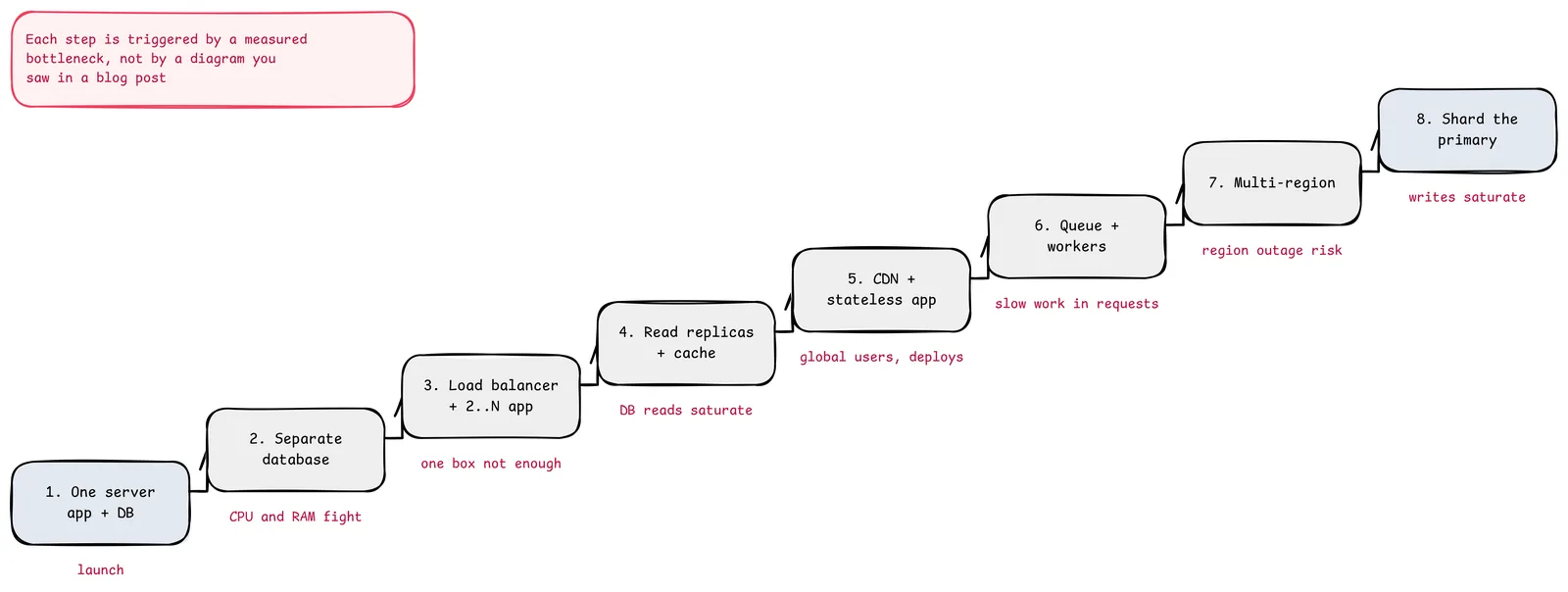
The red note is the rule for the whole post. Each step below lists what triggers it, what it buys and what new problem it creates.
Step 1: One Server
App, database and files on a single machine. It is the right architecture for a new product: one thing to deploy, one thing to back up, no network between components.
Trigger to move on: the app and database fight over CPU and memory, or you need to restart one without the other.
Step 2: Separate the Database
Put the database on its own machine (or a managed service). Now each can be sized independently, and the database host does nothing but serve queries.
New problem: the network hop. Queries that were cheap on localhost now cost a round trip, so N+1 query patterns suddenly matter.
Trigger to move on: the app server's CPU is saturated at peak, or you cannot tolerate downtime when that one box restarts.
Step 3: Load Balancer and Multiple App Servers
Put two or more app servers behind a load balancer. Scaling the web tier becomes adding machines.
New problem: state. If a user's session lives in one server's memory, the next request may land somewhere else. Either use sticky sessions (simple, fragile) or, better, move sessions out of the app servers entirely (step 5).
Trigger to move on: the database, not the app tier, is now the limit. Usually reads.
Step 4: Read Replicas and a Cache
Most products read far more than they write. Two tools attack reads:
- Read replicas take copies of the primary's data asynchronously and serve read queries.
- A cache (Redis or memcached) holds hot results in memory using cache-aside: read from the cache, on miss read the database and populate the cache with a TTL.
New problems:
- Replication lag. A user updates their profile, refreshes, and sees the old value because the read hit a replica. Route a user's reads to the primary for a short window after they write (read-your-writes), or read critical data from the primary.
- Cache invalidation and stampedes. Delete or update cache keys on writes, use TTLs as a safety net, and coalesce concurrent misses for the same key.
Trigger to move on: global users see slow page loads, or deploys are painful because servers hold state.
Step 5: CDN and Stateless App Servers
- CDN. Serve images, scripts, styles and video from edge locations near users. The origin only serves dynamic responses.
- Stateless app servers. Sessions move to a shared store (Redis or signed tokens), uploads go to object storage, and nothing important lives on an app server's disk. Any server can handle any request, so autoscaling and deploys become routine.
New problem: cache headers and invalidation for static assets. Fingerprint file names (app.3f9c1.js) so you never need to purge.
Trigger to move on: requests are slow because they do slow work inline (sending email, resizing images, calling third parties).
Step 6: Queues and Workers
Move slow or failure-prone work out of the request path. The request writes a message and returns; workers process it.
New problems: retries and idempotency (a message can be delivered twice), ordering (only within a partition, if at all), and visibility (a backlog is invisible unless you graph it). A dead-letter queue and queue-depth alerts are mandatory.
Trigger to move on: a single region's outage would be a business-ending event, or users far away have unacceptable latency for dynamic requests.
Step 7: Multiple Regions
Run the stack in two or more regions with GeoDNS or anycast routing users to the nearest healthy one.
| Model | How it works | Cost |
|---|---|---|
| Active-passive | One region serves traffic; the other is a warm standby with replicated data | Failover takes minutes and must be rehearsed; recent writes may be lost |
| Active-active, partitioned | Each user's data has a home region; both regions serve traffic | Routing and data placement logic; cross-region requests for shared data |
| Active-active, global data | Every region accepts writes to shared data | Conflict resolution or a globally consistent database with higher write latency |
New problem: data. Stateless tiers replicate trivially; databases do not. Choose the model by asking what happens to a write made one second before a region fails.
Trigger to move on: the primary database can no longer absorb the write load even on the largest machine you can buy.
Step 8: Shard the Primary
Before sharding, exhaust the cheaper options: a bigger machine, query and index tuning, moving write-heavy features to separate databases by domain (federation), and archiving cold data. Sharding is the last step for a reason.
When you do shard, split rows across many databases by a shard key:
- Choose the key from the dominant access pattern. A multi-tenant SaaS shards by tenant; a social app often by user. Queries that include the key hit one shard.
- Avoid hot shards. Hash the key rather than using ranges of time or sequential IDs.
- Plan resharding from day one. Use many logical shards mapped to fewer physical databases, so growth means moving logical shards, not rehashing every row (see consistent hashing).
New problems: cross-shard queries and transactions become application code, unique constraints across shards need a global ID scheme (unique ID generator), and operations multiply by the number of shards.
The Destination, For Reference
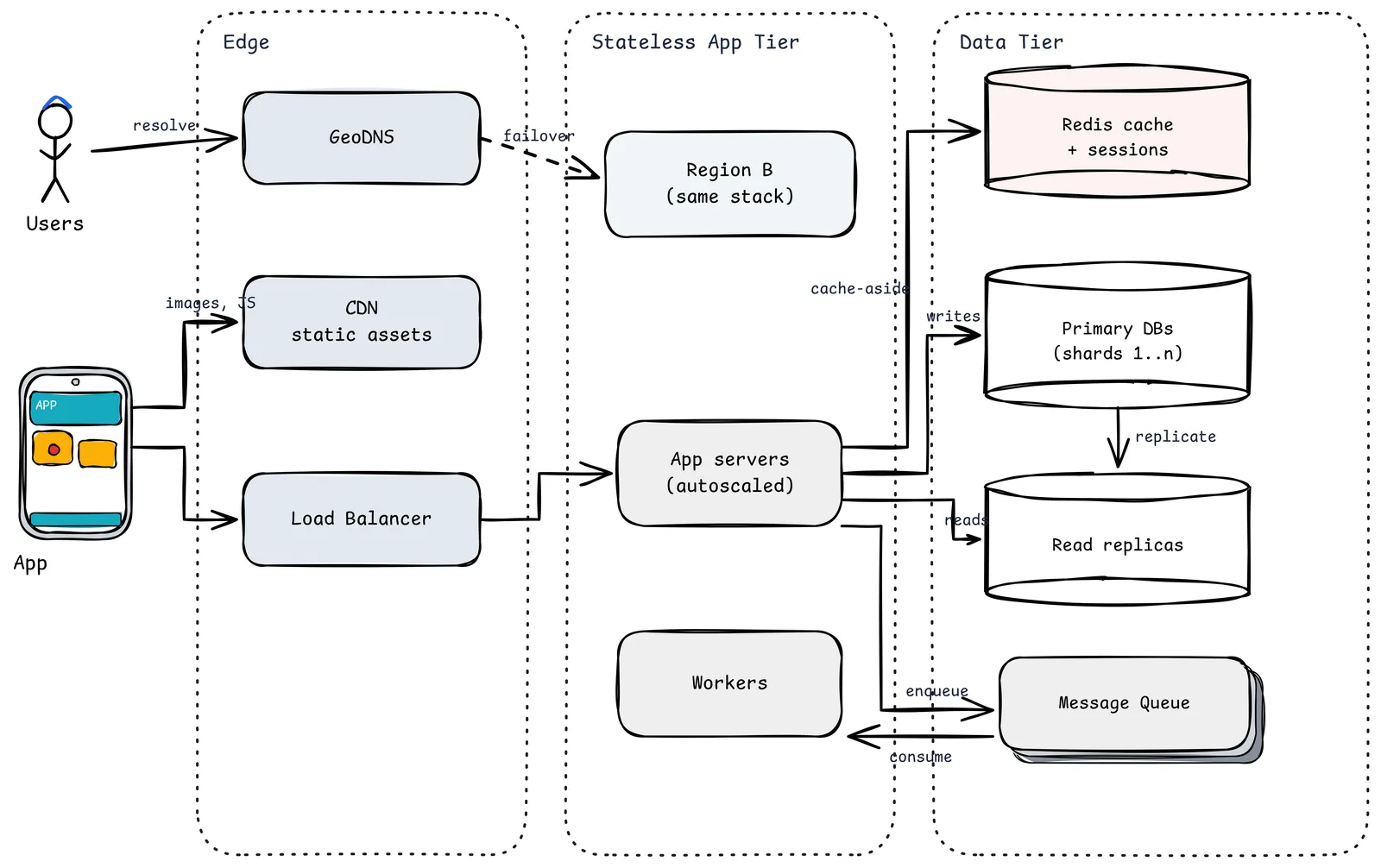
- GeoDNS sends users to the nearest healthy region and fails over to Region B.
- CDN serves static assets from the edge.
- Load Balancer spreads requests across autoscaled, stateless App servers.
- Redis holds cache entries and sessions.
- Primary DBs (shards 1..n) take writes; Read replicas take read traffic.
- Message Queue and Workers handle everything that does not need to finish before the response.
This is where many large products end up. It is a terrible place to start.
What to Measure So You Know When to Move
| Signal | Suggests |
|---|---|
| App CPU high at peak, DB fine | Add app servers (step 3) |
| DB CPU or IO high, mostly reads | Replicas and cache (step 4) |
| High p99 for users far from your region | CDN (step 5), then regions (step 7) |
| Request latency dominated by external calls | Queues and workers (step 6) |
| Primary write throughput or storage near the limit after tuning | Federation, then sharding (step 8) |
The Leftover
The most expensive architecture is the one you built for traffic you do not have. The second most expensive is the one that falls over the day the traffic arrives.
The way between them is boring: a few dashboards, a written list of the next three steps, and the discipline to take a step only when a graph tells you to. The impressive diagram will still be there when you need it.
Sources
- Nick Craver: Stack Overflow, The Architecture (2016 Edition)
- Instagram Engineering: What Powers Instagram
- AWS Well-Architected Framework: Reliability pillar (multi-region patterns)
- Martin Fowler: CQRS and read models
- Related in this series: Back-of-the-Envelope Estimation, Design Consistent Hashing, Redis caching patterns