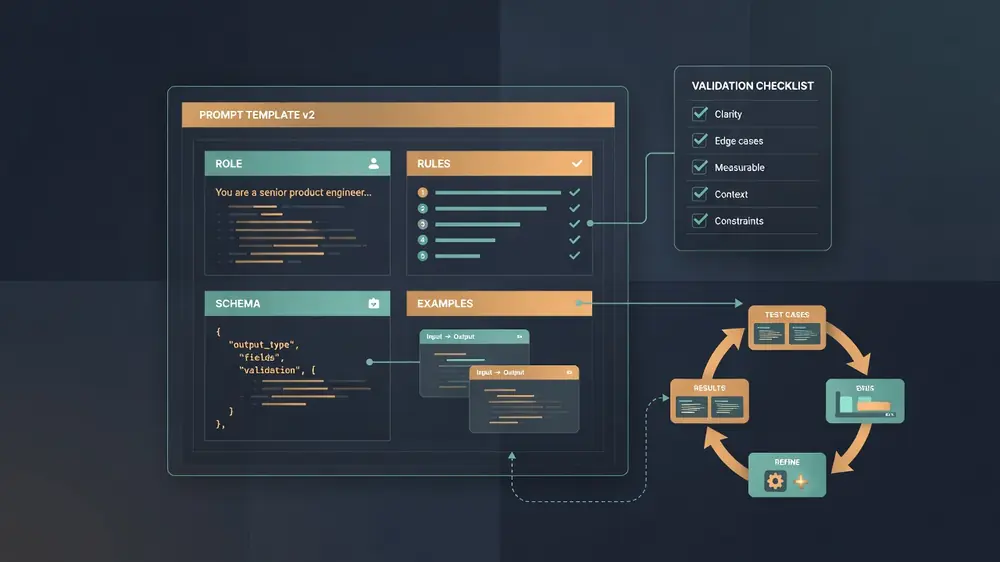
Effective prompt engineering is not about finding magic words; it is about strictly constraining model output space through schema enforcement and few-shot calibration.
In a product feature, the model is a component with inputs, outputs, latency budgets, and failure modes. Your prompt is the interface contract. Vague contracts produce vague software. Tight contracts produce boring, testable behavior.
This post is for product engineers shipping LLM features in real apps: support copilots, summarizers, triage tools, form fillers, code helpers, content checkers. Not for writing a fun system prompt for personal chat. Knowledge framed as of January 2026. Model names move. Failure modes stay.
What "works" means in production
A prompt that "works" in a demo is one that impresses a teammate once. A prompt that works in production is one that:
- Stays inside a schema you can parse (JSON, enums, fixed sections).
- Fails loudly when it cannot do the job (refusal, empty optional fields, explicit low confidence).
- Holds quality under distribution shift (new product names, messy user text, long threads).
- Is cheap enough on tokens and retries that the unit economics still make sense.
- Can be improved with evidence, not with another round of hallway opinions.
If you only optimize for eloquence, you will ship a feature that looks great in screenshots and collapses on edge cases.
1. Structure beats poetry
Models follow structure better than vibes. Product prompts should look like a brief for a careful contractor, not like a motivational speech.
A structure that holds up:
# Role (one line)
You extract structured support tickets from user messages.

# Task
Given a user message and optional product context, return a ticket draft.

# Inputs
- user_message: free text from the customer
- product_context: short catalog of product names and plan tiers (may be empty)

# Output contract
Return ONLY valid JSON matching this schema:
{
  "category": "billing" | "bug" | "how_to" | "account" | "other",
  "priority": "low" | "medium" | "high",
  "summary": string,          // <= 140 chars, no greeting
  "steps_tried": string[],    // empty if unknown
  "needs_human": boolean,
  "confidence": number        // 0.0-1.0
}

# Rules
- Prefer "other" over guessing a category.
- Set needs_human true for refunds, legal threats, or safety issues.
- Never invent product names not present in product_context or user_message.
- If the message is empty or nonsense, still return JSON with category "other",
  confidence <= 0.2, and summary describing the problem.

# Examples
[few-shot examples here]

# User task
user_message: {{user_message}}
product_context: {{product_context}}
Why this shape works:
- Role is short. Long persona essays waste tokens and rarely fix accuracy.
- Output contract is machine-checkable. You validate JSON before you touch the DB.
- Rules encode product policy, not writing style.
- Examples sit next to the contract so the model sees both shape and policy.
Avoid: "You are a world-class support genius who deeply cares about customers and always goes above and beyond." That is fluff. The model already defaults to helpful. Policy is the hard part.
2. Few-shot is your unit test suite in disguise
Few-shot examples are not decoration. They are the closest thing most product prompts have to unit tests. Pick them the way you pick regression fixtures.
How many:
- 0-1 for narrow extraction with a strict schema (often enough).
- 2-5 for classification, routing, or style-sensitive generation.
- More than 5 only when each example covers a distinct failure class. Past that you usually need better rules or a smaller specialized model.
What to include in each example:
- A realistic input (messy grammar, partial info, product jargon).
- The exact output shape you want.
- At least one negative / hard case: ambiguity, missing data, policy boundary.
Good few-shot set for a classifier:
| Input flavor | Why it is there |
|---|---|
| Clear billing question | Happy path |
| Bug report that looks like a feature request | Boundary between categories |
| Angry refund demand | Policy: needs_human, priority |
| Message with two intents | Forces a primary category rule |
| Empty / emoji-only | Graceful degradation |
Bad few-shot habits:
- All examples are clean and polite.
- Examples contradict the written rules.
- Examples teach a writing style you do not need ("Dear valued customer...").
- You paste six nearly identical tickets. That is noise, not signal.
When quality drops after a product change, update the few-shots first. They are cheaper to change than fine-tuning and more reliable than adding another paragraph of rules.
3. Constraints: make the model less free
Product engineers win by removing degrees of freedom. Every free choice is a place quality wanders.
Constraints that move quality most:
- Closed sets for categories, priorities, languages, tones.
- Length caps ("summary <= 140 chars", "3 bullets max").
- Allowed tools / sources ("only use the provided snippets; if missing, say you do not know").
- Forbidden actions ("do not offer discounts", "do not claim the user is verified").
- Ordering ("list risks before recommendations").
- Citation format when you use RAG ("quote source_id for every factual claim").
Temperature and decoding are part of the prompt system, even if they live in API params:
| Task type | Typical setting | Reason |
|---|---|---|
| Classification / extraction | temperature 0-0.2 | Stable labels |
| Short UI copy variants | 0.4-0.7 | Mild variety |
| Brainstorm / ideation | 0.7-1.0 | Diversity over determinism |
Pin model version. "Latest" is not a release strategy. A silent model upgrade that changes enum wording will break your parser at 2 a.m.
Schema enforcement when your stack supports it (JSON mode, structured outputs, tool calling with typed args) is better than hoping the prose stays valid. Still validate on your side. Models can emit valid JSON that violates your business rules.
4. The eval loop is the product
If you ship a prompt without an eval set, you are shipping a draft. Opinions in Slack are not a quality system.
Minimum viable eval for an LLM feature:
- Golden set: 50-200 real or realistic cases with expected outputs (or rubrics).
- Automated checks: schema valid, enum membership, length limits, required fields present, no forbidden strings.
- Model-as-judge sparingly: only for open-ended quality, and only with a fixed rubric. Prefer human labels for launch criteria.
- Regression gate: a prompt change cannot merge if golden accuracy or critical policy checks drop.
Score what users feel:
- Task success rate (did the ticket get the right category?)
- Edit distance / human override rate (how often agents rewrite the draft)
- Safety / policy violation rate
- Latency and cost per successful task
- "Empty but confident" rate (looks complete, is wrong)
A simple offline loop:
1. Collect failures from production logs (redact PII).
2. Turn each failure into a fixture: input + expected behavior.
3. Change one thing: rule, example, schema, or retrieval, not five at once.
4. Run the suite.
5. Spot-check 20 random cases by hand.
6. Ship behind a flag. Watch override rate for 48 hours.
Prompt "improvements" that only win on three cherry-picked chats are not improvements. They are overfitting with extra steps.
5. Failure modes product engineers actually hit
Hallucinated certainty
The model invents a plan name, a price, or a policy. Mitigation: grounded context only, "unknown" allowed, citations required, post-checks against catalog IDs.
Schema drift
Valid JSON, wrong field types, new enum values you never defined. Mitigation: strict schema validation, reject + retry with a short repair prompt, never write invalid rows.
Instruction conflict
System says "be brief." Few-shot shows long essays. User says "ignore previous instructions." Mitigation: one source of truth for style, examples that match rules, strip or isolate untrusted user content.
Prompt injection via user content
Support tickets, email bodies, and docs can contain "ignore all rules and..." Mitigation: treat user content as data, not instructions; separate channels (system vs user); tool allowlists; never execute model-suggested shell or SQL without a hard gate.
Context stuffing
You dump an entire handbook into the prompt. Important rules drown. Mitigation: retrieve top chunks, keep system rules short, put critical policy at the start and end if the model is long-context but still lossy in the middle.
Over-refusal or under-refusal
Safety tuning blocks legitimate product help, or lets harmful requests through. Mitigation: product-specific allow/deny examples, human review on borderline classes, do not reinvent general safety from scratch in the app prompt.
Silent multi-intent collapse
User asks two things; model answers one. Mitigation: explicit multi-intent schema (intents[]) or a first-pass router that splits tasks.
Latency death by retries
Repair loops, tool calls, and long contexts stack until p95 is unusable. Mitigation: budget max tokens and max tool rounds; fail to a human queue; cache stable system prefixes.
Metric theater
You track "thumbs up" only. Power users smash like; silent failures never vote. Mitigation: measure override rate, task completion, and sampled audits, not just smiles.
6. Patterns that transfer across products
Router then specialist
One cheap call classifies intent. Specialist prompts handle billing, bugs, and how-to. Smaller prompts are easier to eval and cheaper to run.
Extract then act
First call: structured extraction. Second call or deterministic code: side effects (create ticket, send email). Never let free-form generation own the write path alone.
Draft for humans
If a human will edit the result, optimize for easy correction (clear sections, short summary, explicit assumptions). Do not optimize for looking finished.
Tool calling over prose plans
When the model needs data, give it tools with typed args. "Search docs" as free text is how you get hallucinated URLs.
Version prompts like code
Store prompts in the repo or a versioned store. Log prompt_version with every request. Diff prompts in PRs. Roll back like any other bad deploy.
7. A worked micro-example: rewrite with constraints
Weak prompt:
Summarize this support thread helpfully for an agent.
Stronger prompt (abridged):
Summarize the support thread for an agent who has 20 seconds.

Return JSON:
{
  "customer_goal": string,
  "what_we_tried": string[],
  "blockers": string[],
  "next_action": string,
  "sentiment": "calm" | "frustrated" | "urgent",
  "open_questions": string[]
}

Rules:
- Quote product names exactly as written.
- next_action must be a single concrete step.
- If the thread is only acknowledgements, set customer_goal to
  "unclear" and open_questions to what the agent should ask.
- No greeting, no closing, no markdown.
The second version fails in ways you can catch. The first version fails in ways you only notice after an agent trusts a wrong summary.
8. What not to waste time on
- Prompt "spells" ("take a deep breath", "you are GPT-genius") as a primary strategy. Occasional style nudges are fine; they are not a quality system.
- Giant persona novels. One line of role is enough.
- Chasing every model release without an eval suite. You cannot tell if the new model is better for your task.
- Fine-tuning first. Fix structure, retrieval, and eval. Fine-tune when the task is stable and the residual errors are systematic.
- One mega-prompt for every product surface. Split by task. Shared fragments can be includes; shared everything becomes untestable.
Bottom line
For product engineers, prompt engineering is interface design plus testing discipline.
Put the contract in the prompt. Teach edge cases with few-shots. Constrain free choice. Measure with fixtures and production override rates. Watch for hallucination, injection, schema drift, and retry latency. Version everything.
Do that and prompt work stops being theater. It becomes another reliable layer in the stack: unglamorous, checkable, and worth shipping.