
Java Virtual Threads fundamentally rewrite the economics of concurrent backend services by decoupling lightweight application tasks from expensive kernel threads.
Java 21 virtual threads (Project Loom) change that model. You can run a huge number of concurrent blocking tasks without sizing a classic worker pool for every request.
The Problem with Platform Threads
Traditionally, every java.lang.Thread mapped 1:1 to an operating system (OS) thread. These are known as Platform Threads.
Platform threads are heavy:
- High Memory Overhead: Each OS thread consumes around 1-2 MB of memory for its stack. Creating 10,000 threads instantly requires 10-20 GB of RAM.
- Context Switching Cost: The OS kernel handles the scheduling of these threads. When a thread blocks (e.g., waiting for a database response or HTTP call), the kernel must perform an expensive context switch to another thread.
- Thread Exhaustion: Because of their weight, we have to limit them using thread pools (e.g., Tomcat's default max of 200). If your application experiences a surge in blocking I/O calls, the pool gets exhausted, leading to timeouts and cascading failures.
To solve this, frameworks introduced Asynchronous/Reactive Programming (like Spring WebFlux or RxJava). This allowed handling many concurrent connections on a few threads, but it came at a steep cost: code complexity, "callback hell", and broken stack traces.
Enter Virtual Threads
Virtual threads are lightweight threads managed by the Java Virtual Machine (JVM), not the operating system.
Multiple virtual threads are multiplexed onto a small pool of underlying OS carrier threads. When a virtual thread makes a blocking I/O call (like querying a database), the JVM automatically suspends it, moving its state to the heap. The underlying OS thread is instantly freed up to execute another virtual thread.
When the I/O operation completes, the JVM resumes the virtual thread where it left off.
Creating Virtual Threads with Thread.ofVirtual()
Creating a virtual thread is as simple as:
Thread.ofVirtual().start(() -> {
    System.out.println("Running on a virtual thread!");
});
Because virtual threads consume only a few bytes of memory, you don't need to pool them. In fact, pooling virtual threads is considered an anti-pattern. You can easily create a million of them simultaneously:
try (var executor = Executors.newVirtualThreadPerTaskExecutor()) {
    IntStream.range(0, 1_000_000).forEach(i -> {
        executor.submit(() -> {
            Thread.sleep(Duration.ofSeconds(1));
            return i;
        });
    });
}
This code completes in roughly 1 second on a standard laptop, something entirely impossible with platform threads.
When to Use Virtual Threads
Virtual threads shine in I/O-bound applications. If your microservice spends most of its time waiting for databases, external REST APIs, or file systems, virtual threads will massively increase your throughput and resource efficiency.
You get the performance benefits of reactive programming while writing simple, readable, synchronous code. Stack traces remain intact, and traditional debuggers work perfectly.
When NOT to Use Virtual Threads
Virtual threads are not a universal fix. You should avoid them for:
- CPU-bound tasks: Video encoding, heavy mathematical computations, or tight loops. Since virtual threads still run on carrier OS threads, they won't make your CPU crunch numbers any faster.
- Pinned Threads: Operations that call native code (JNI) or use
synchronizedblocks can "pin" the virtual thread to its carrier OS thread, preventing the JVM from swapping it out. Migratesynchronizedblocks toReentrantLockwhen adopting virtual threads.
Benchmarking & Performance Analysis
To see the practical impact of Virtual Threads compared to traditional Platform Threads, I ran a benchmark comparing standard Tomcat thread pool performance (using a Spring Boot 3.x app) under an I/O-bound workload.
The load test simulated 3,000 total requests at different concurrency levels (50, 150, 300, 500, 1000) with a simulated I/O delay of 100ms per request. The full codebase and setup can be found in the GitHub Repository.
Throughput Comparison (Higher is Better)
| Concurrency | Platform Threads (req/s) | Virtual Threads (req/s) | Scale Improvement |
|---|---|---|---|
| 50 | 467.26 | 455.28 | 0.97x |
| 150 | 1316.24 | 1288.79 | 0.98x |
| 300 | 1768.79 | 2297.41 | 1.30x |
| 500 | 1780.12 | 3451.08 | 1.94x |
| 1000 | 1754.76 | 5070.74 | 2.89x |
Latency Comparison (Lower is Better)
| Concurrency | Platform Latency (Mean / P95) | Virtual Latency (Mean / P95) | Latency Reduction |
|---|---|---|---|
| 50 | 107.0ms / 108ms | 109.8ms / 110ms | -2.6% (Overhead limit) |
| 150 | 114.0ms / 111ms | 116.4ms / 113ms | -2.1% (Overhead limit) |
| 300 | 169.6ms / 212ms | 130.6ms / 116ms | 23.0% |
| 500 | 280.9ms / 362ms | 144.9ms / 136ms | 48.4% |
| 1000 | 569.9ms / 711ms | 197.2ms / 260ms | 65.4% |
Visualizing the Results
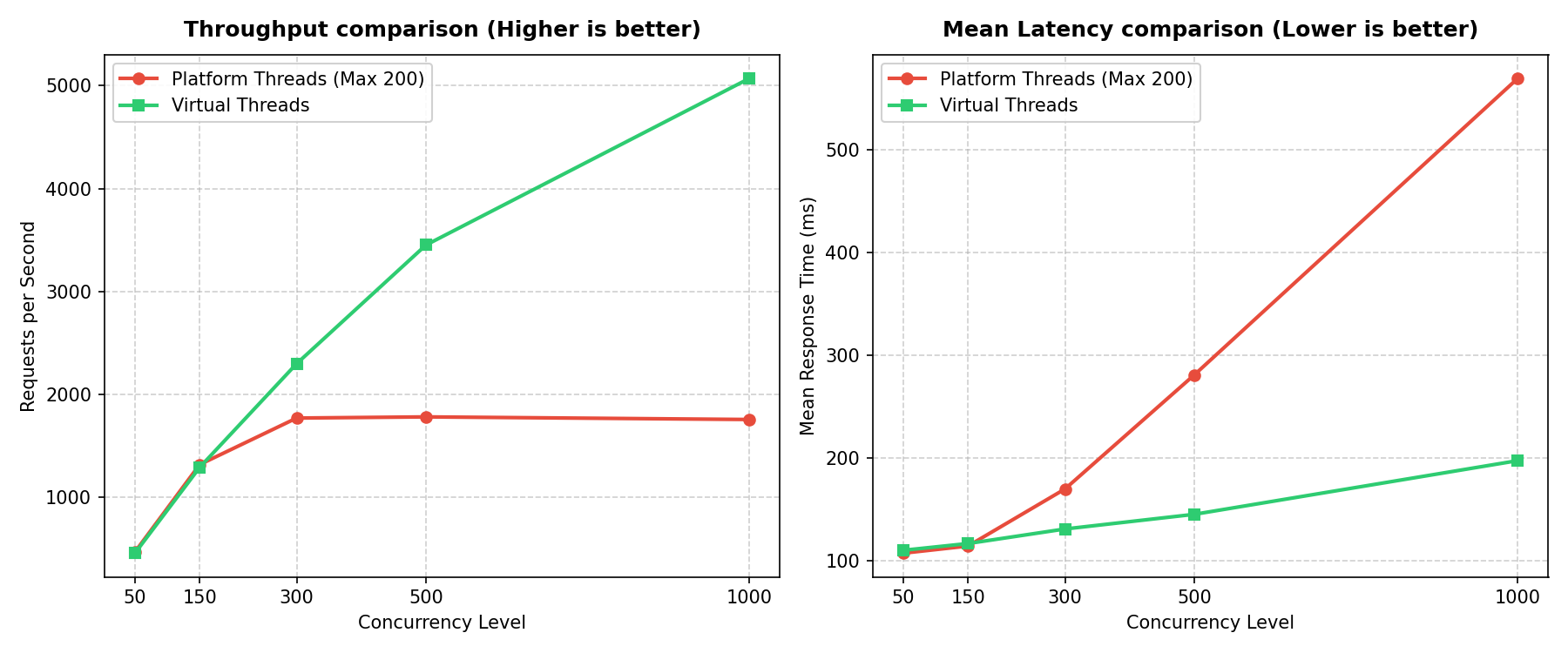
Key Observations
- Low Concurrency (<= 200): Under 200 concurrency (below Tomcat's max thread pool limit), Platform Threads and Virtual Threads perform identically. This shows that Virtual Threads do not make CPU code execution faster; they enable scale.
- Queuing Bottleneck (> 200): Once concurrency exceeds Tomcat's max thread limit (200), Platform Threads pool runs dry. Incoming requests wait in the TCP queue, causing mean latency to shoot up (e.g. to 569.9ms at 1000 concurrency).
- Throughput Scaling: Platform threads throughput caps around 1780 req/s (200 threads * 10 req/s/thread). Virtual threads handle the concurrency gracefully, scaling throughput up to 5070.74 req/s (a 2.89x improvement) while keeping mean latency under 200ms.
Conclusion
Java 21's virtual threads are one of the biggest concurrency updates since lambdas in Java 8. By making threads cheap to create, Project Loom reduces the need for complex reactive code and oversized thread pools, and makes high-concurrency Java applications simpler to write.