TL;DR
- The Problem: Keep the same folder identical across a laptop, a phone and a browser, for tens of millions of users with gigabytes each, over flaky networks, while people edit the same files offline and expect nothing to ever be lost.
- The Design: Split files into fixed-size blocks identified by their hash, upload only the blocks the server does not already have, and commit each new version as a list of block hashes in a metadata database. Every commit appends to a per-namespace change journal; a notification service tells other devices to pull changes after their cursor. Commits use optimistic concurrency, and losing a race produces a conflicted copy instead of a silent overwrite.
- The Result: Editing a large file uploads megabytes instead of gigabytes, identical content is stored once, devices catch up with one cursor query, and the only data-loss scenario left is the one users cause on purpose.
A sync product makes a promise that sounds simple and is not: the folder is the same everywhere. Underneath, it is a distributed system where every laptop is a replica that goes offline for days, and the users editing it are the ones writing the conflicts.
Dropbox popularized the architecture this post describes, and Google Drive, OneDrive and iCloud Drive solve the same problem in broadly similar ways.
Requirements and Numbers
Functional: upload, download and sync files and folders across devices; version history and restore; sharing with permissions; offline edits that sync later; notifications when shared content changes.
Non-functional: never lose acknowledged data; sync changes within seconds when devices are online; efficient on slow and metered networks; scale to hundreds of petabytes.
| Assumption | Value | Derived |
|---|---|---|
| Users | 50M | |
| Average stored per user | 10 GB | ~500 PB logical, before dedup and compression |
| File changes per user per day | ~2 | ~100M commits/day, ~1,200/s average |
| Average file size | ~500 KB, with a long tail of multi-GB files | Most commits are small; a few dominate bandwidth |
| Devices per user | 2 to 3 | Every change is downloaded by 1 to 2 other devices |
The Architecture
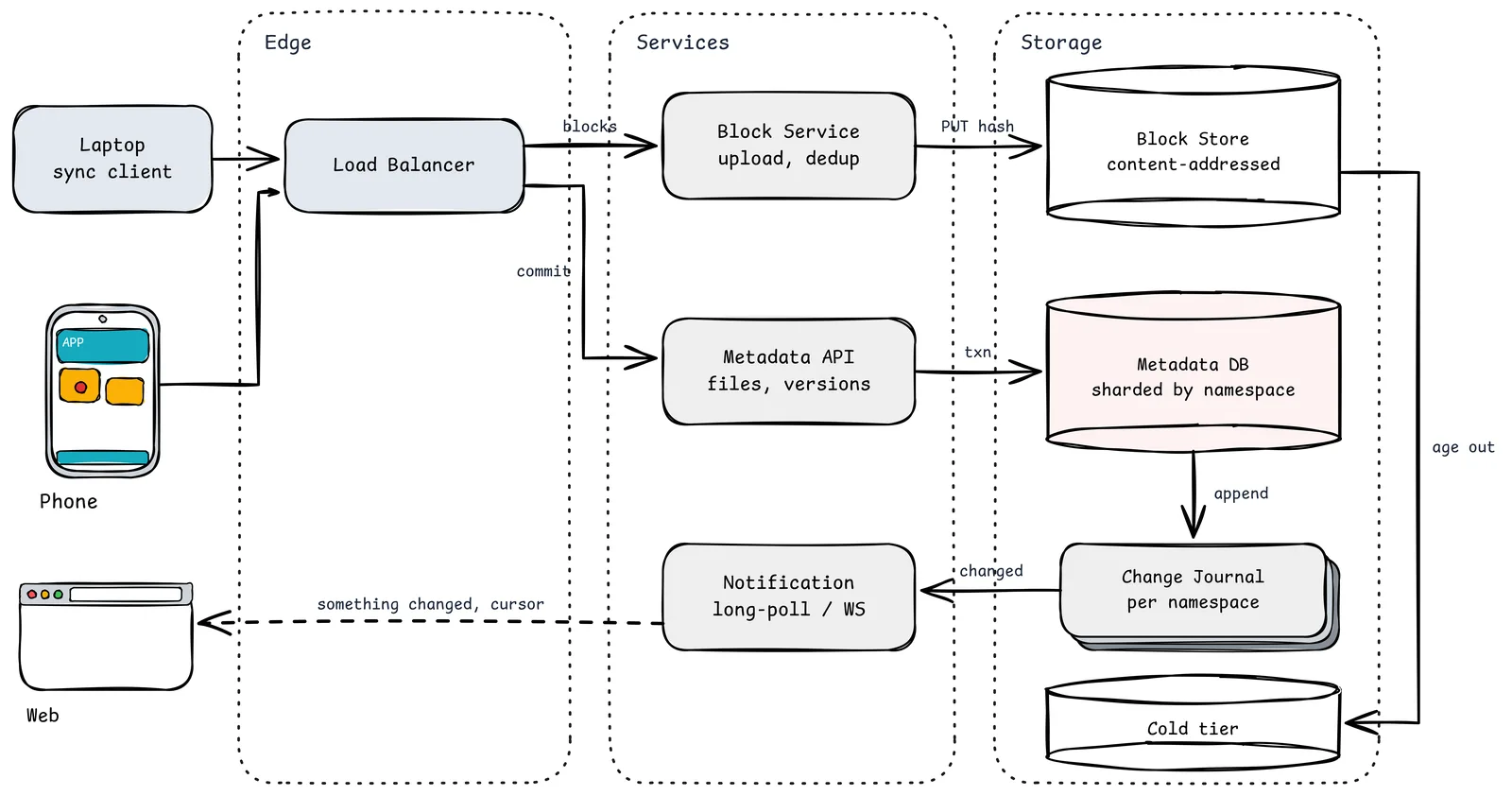
- Laptop sync client. The most complex piece. It watches the file system, keeps a local database of what it believes the server has, splits changed files into blocks, uploads, commits, and applies remote changes. Dropbox rewrote theirs (the "Nucleus" engine, in Rust) specifically because sync correctness is that hard.
- Phone / Web. Usually do not mirror the whole folder; they browse metadata and download files on demand.
- Load Balancer. Routes block traffic and metadata traffic to separate fleets, because their shapes differ: large streaming bodies versus small transactional requests.
- Block Service (upload, dedup). Accepts blocks addressed by hash. If a block with that hash already exists, the upload is skipped. Supports resumable transfers.
- Block Store (content-addressed). An object store where the key is the block's hash. Immutable: a block is never modified, only referenced or garbage-collected. Dropbox moved most of this tier from Amazon S3 into its own exabyte-scale system, Magic Pocket, in 2016.
- Metadata API (files, versions). The authoritative record of the tree: paths, versions, block lists, permissions. Every change is a transaction here.
- Metadata DB (sharded by namespace). A namespace is a user's root or a shared folder. Sharding by namespace keeps a folder's whole history and its journal on one shard, so commits are single-shard transactions.
- Change Journal (per namespace). An ordered log of every commit in a namespace. Each device remembers its cursor (position in the journal).
- Notification (long-poll / WebSocket). Does not carry the changes, just "something changed in namespace N." The device then asks the metadata API for everything after its cursor.
- Cold tier. Blocks referenced only by old versions or rarely accessed files move to cheaper storage.
Why Blocks Change Everything
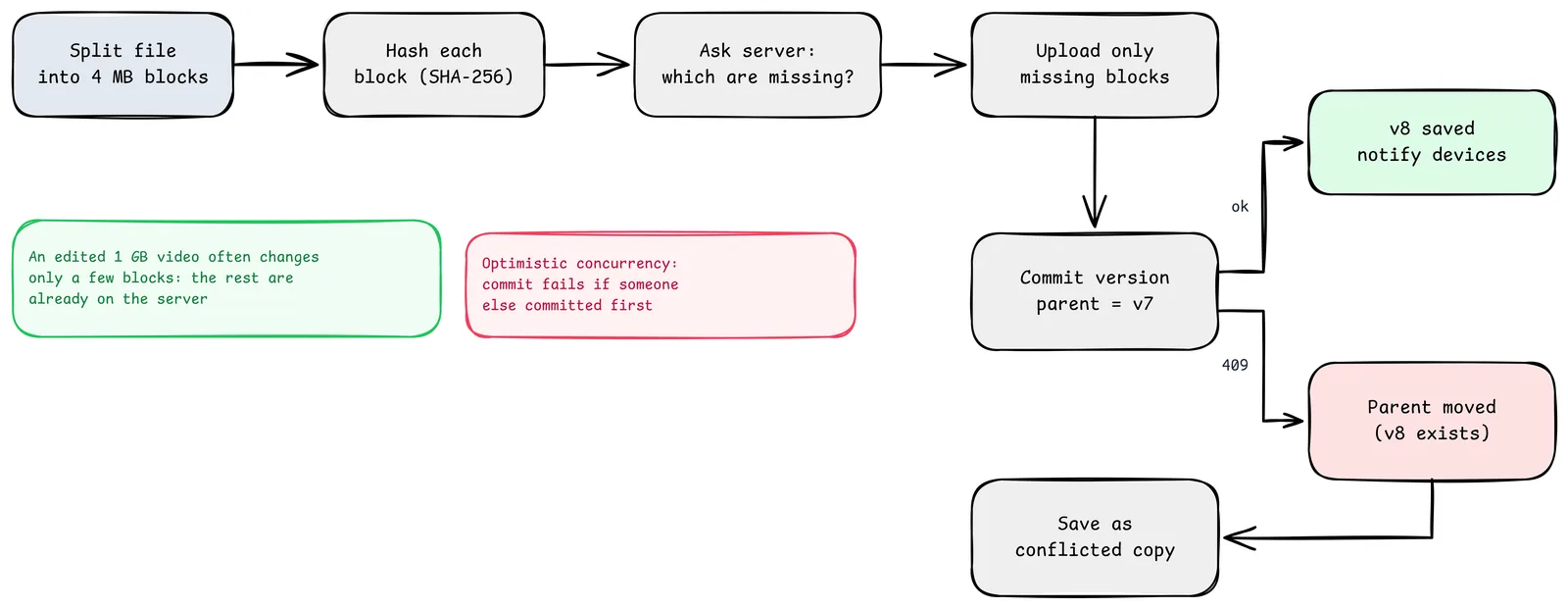
Treating files as whole objects means changing one byte of a 1 GB video re-uploads 1 GB. Treating them as lists of blocks fixes three problems at once:
- Delta sync. Only changed blocks travel. Dropbox has described using 4 MB blocks. An edit in the middle of a large file usually touches one or two blocks. (Fixed-size blocks shift when bytes are inserted early in a file; content-defined chunking with a rolling hash, the idea behind rsync and many backup tools, keeps boundaries stable at the cost of more complexity.)
- Deduplication. Identical blocks are stored once, whether they are in the same file's previous version, a copy the user made, or the same installer downloaded by many users. Cross-user deduplication has privacy implications: an attacker can learn whether some content already exists by watching upload speed, so many services limit dedup to within an account.
- Resumability. A failed upload resumes at the next missing block, not from zero.
The commit protocol:
- Client hashes blocks and asks "which of these hashes do you lack?"
- Client uploads only those.
- Client commits
file X, new block list, parent version v7. - Server accepts only if the current version is still v7, then appends to the journal.
The green note is the practical payoff. The red note is the concurrency rule that makes the next section work.
Conflicts: Never Silently Pick a Winner
Two devices edit the same file offline. Both come online. Both commit with parent v7. The first wins and becomes v8. The second gets "conflict: parent has moved."
What should the client do? Every major sync product made the same choice: keep both. The losing edit is saved alongside as something like report (Alice's conflicted copy 2026-02-10).docx. It is ugly. It is also the only answer that never destroys someone's work.
Real-time collaborative editors (Google Docs, Office online) avoid this differently: they sync fine-grained operations through operational transformation or CRDTs, not whole files. File sync and document collaboration are different products for a reason.
Other conflict cases worth handling explicitly:
| Case | Sensible resolution |
|---|---|
| Edit on one device, delete on another | Keep the edited file; deletes should not destroy newer edits |
| Rename on one device, edit on another | Apply both: the file ends up renamed with the new content |
| Two folders created with the same name | Merge if safe, otherwise suffix one |
| Case-only renames on case-insensitive file systems | Treat carefully; a classic source of sync bugs |
Versions, Restore and Deletion
Because blocks are immutable and versions are lists of block hashes, version history is almost free: each version is a small metadata row. Restoring an old version is a new commit pointing at the old block list.
Deleting is harder than it looks. A block can be removed only when no version of any file references it, and versions are retained for a policy window (for example 30 days or longer on paid tiers). Garbage collection is a careful background job of reference counting or mark-and-sweep over metadata, because deleting a block that is still referenced is permanent data loss.
Sharing
A shared folder is its own namespace, mounted into each member's tree. Permissions live on the namespace (viewer, commenter, editor). Because the journal and notifications are per namespace, an edit by one member notifies every member's devices through exactly the same path as a user's own changes.
Links ("anyone with the link") are a separate, revocable grant with optional expiry and password, checked by the metadata API on every access.
Failure Modes
| Failure | Behavior |
|---|---|
| Upload interrupted | Resume with the next missing block |
| Commit succeeds, client crashes before recording it | On restart, client queries the journal and sees its own commit |
| Notification service down | Clients fall back to periodic polling of their cursor |
| Metadata shard down | That namespace cannot commit; others are unaffected. Clients queue local changes |
| Corrupt block in storage | Hash mismatch detected on read; repair from a replica or erasure-coded fragments |
| A client bug deletes everything locally | Server-side version history and trash make it recoverable; rate-limit mass deletes and confirm them |
Production Checklist
- Block hashing and missing-block negotiation before upload
- Content-addressed, immutable block storage with integrity checks on read
- Metadata sharded by namespace; commits as single-shard transactions
- Optimistic concurrency with parent versions; conflicted copies, never silent overwrites
- Per-namespace change journal and device cursors
- Notifications as hints with polling fallback
- Version retention policy and safe, audited garbage collection
- Mass-delete protection and trash
- Dashboards: sync latency (commit to other device applied), conflict rate, upload bytes saved by dedup, journal lag
The Leftover
The magic of a sync folder is that people forget it is there. They save a file on a laptop at night and open it on a phone in the morning without thinking about the hundreds of blocks, hashes, journals and cursors in between.
The day they remember it is there is usually the day it made a conflicted copy. Ugly name, both versions intact. That file is the system keeping its one real promise.
Sources
- Dropbox Tech Blog: Rewriting the heart of our sync engine (Nucleus)
- Dropbox Tech Blog: Inside the Magic Pocket
- Dropbox Tech Blog: Streaming file synchronization
- Dropbox Help: conflicted copies
- Tridgell and Mackerras, "The rsync algorithm"
- Related in this series: Design a Key-Value Store, Design a YouTube-scale video platform, Design a Notification System